Skip to content

Your Tempest station
deserves a better dashboard.

The real-time animated Tempest weather dashboard you've been looking for. Always-on display. Zero setup. No Pi required. Free 7-day trial.

Why Tempest owners need a better dashboard

📱

The stock app is bland

No animations, no always-on mode, no customization. Your $349 station deserves more than a basic readout.

🔧

DIY setup is work

A Raspberry Pi means OS updates, Python dependencies, SD cards that wear out, and a stack you have to maintain. Self-hosted dashboards are great if you enjoy that — most people don't.

Nothing is hosted

Every alternative requires a Raspberry Pi, Docker, or a server. Halcyon is just a URL.

A Tempest weather dashboard that actually looks good

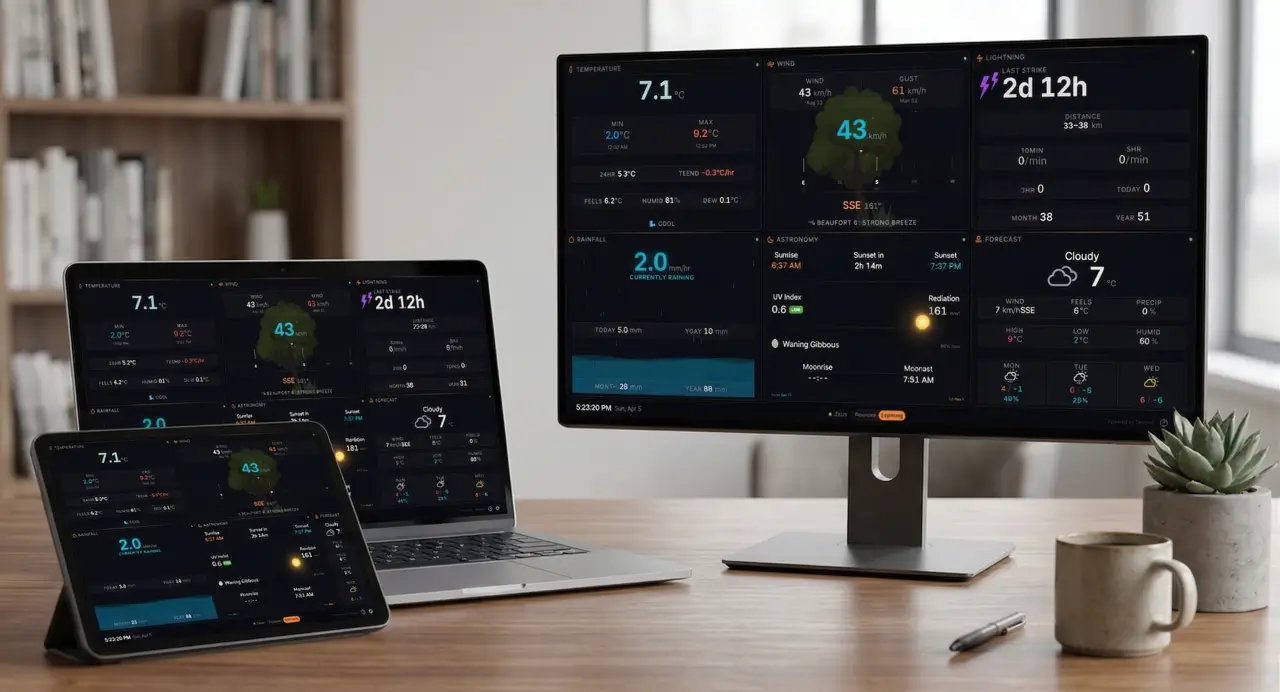
Halcyon dashboard showing real-time animated panels

Real-time animated panels

Live WebSocket data with smooth animations. Animated rain gauge with rising water and wave effects. Wind compass with heading tape. A tree that sways with real-time wind speed. Barometer gauge with sweeping needle. Lightning bolts that flash on real strikes. Not a grid of numbers — a living dashboard.

Air Quality monitoring

Connect any PurpleAir sensor for real-time AQI data — you don't need to own one. US EPA PM2.5 index with color-coded categories from Good to Hazardous. PM2.5 and PM10 readings, historical values across seven time windows, and a 48-hour trend sparkline. Animated particle effects that scale with air quality severity, plus an ambient glow that responds to AQI level.

Halcyon Air Quality panel showing real-time AQI data from PurpleAir
Halcyon on multiple screen sizes

Works on any screen

From a 7-inch Raspberry Pi touchscreen to a 65-inch TV via casting, it just works. Fluid responsive with clamp()-based sizing — no breakpoints, no compromises.

Multi-station & cloud sync

Multiple Tempest stations? Switch between them instantly from the bottom bar. Settings, units, and layout sync across every device. New tablet? Enter your key and you're running.

Halcyon cloud-synced settings
Halcyon data panels

Eleven data panels

Temperature (color-coded hero, min/max, feels-like, 24hr diff), Wind (speed/gust, HUD heading tape, Beaufort scale), Barometer (SVG arc gauge, trend), Rainfall (animated beaker, rate, accumulation), Lightning (distance, counts), Forecast (3-day cards), Air Quality (real-time AQI from PurpleAir), Radar (precipitation map right in the grid), Aviation (METAR conditions from your nearest airport, in visual and raw-text views), and Astronomy — a sun transit arc that tracks the sun across the sky in real time, switching to a starfield with moon phase and rise/set times at night. Assign a secondary panel to any slot and set a rotation timer — or swap manually with a tap.

Your station's entire history, on one screen Plus

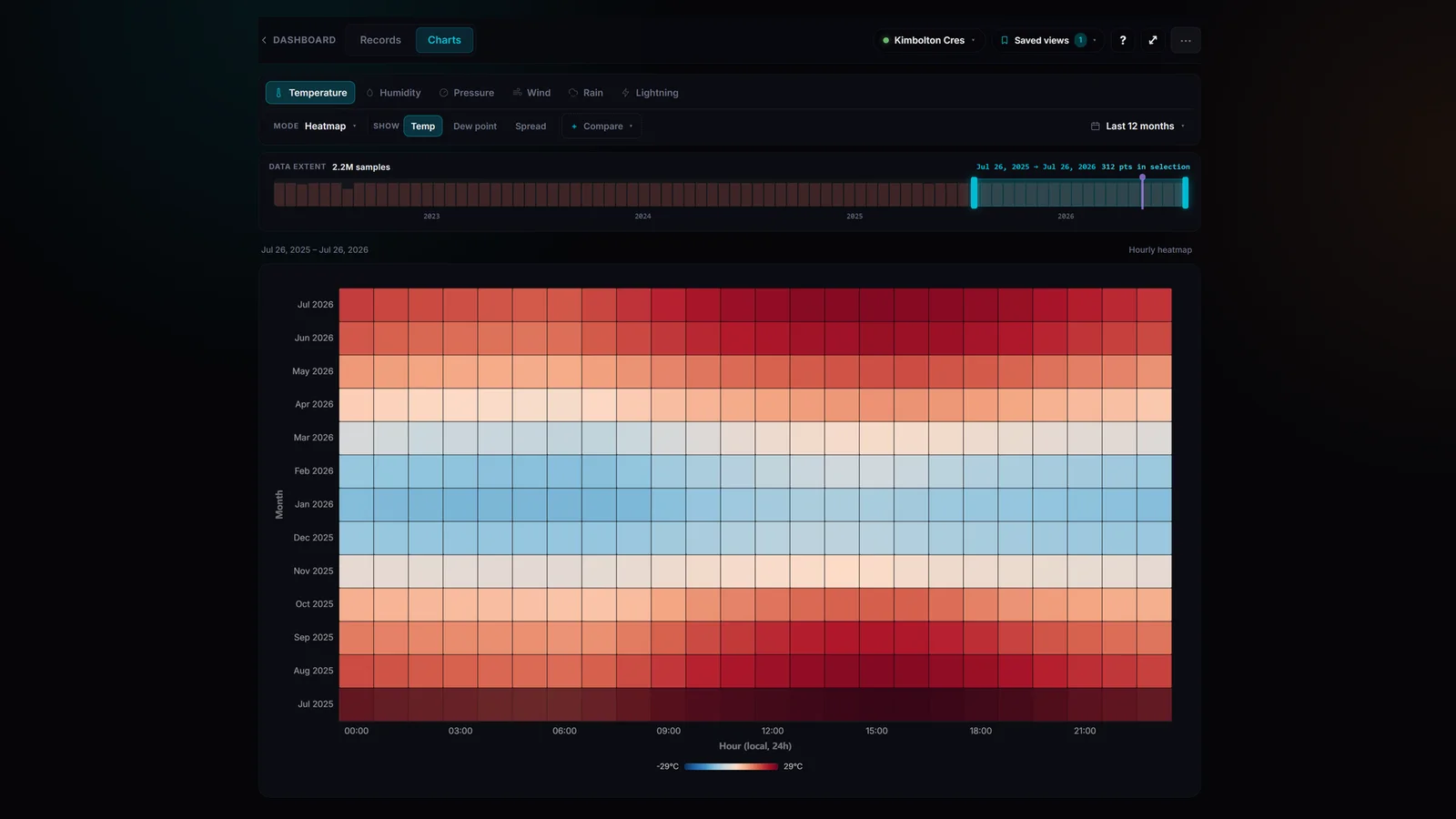
Import every observation your Tempest has ever recorded — years of data, millions of samples — and explore it with interactive charts. Hourly heatmaps reveal the seasonal structure of your climate at a glance. Flip between 7 days and all-time with one tap, drag the timeline to any range, and the right chart type is picked automatically. Temperature, humidity, pressure, wind, rain, and lightning all get the full treatment.

Halcyon history heatmap showing a full year of hourly temperature data
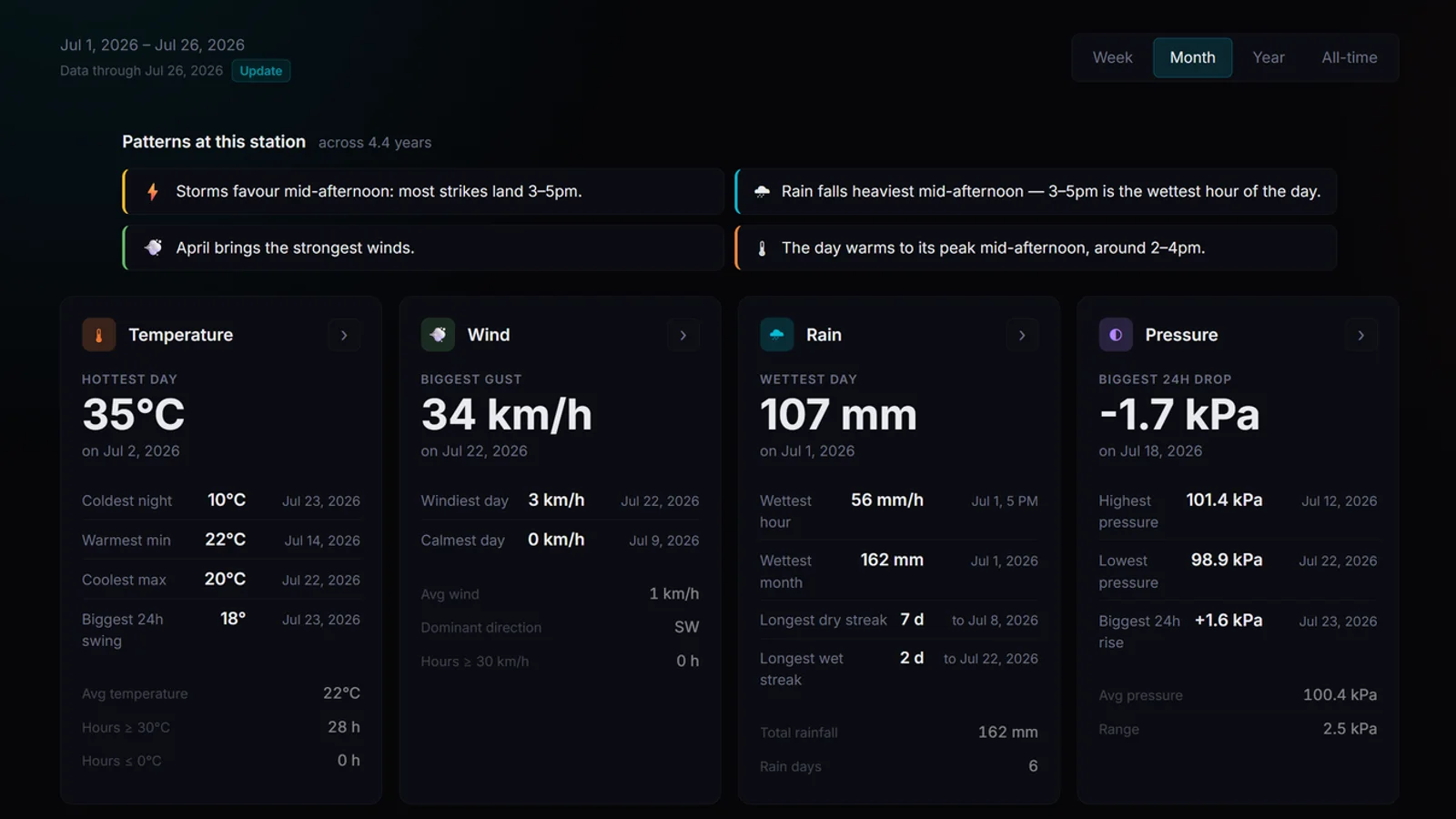
Halcyon records dashboard with station patterns and weekly, monthly, yearly and all-time records

Records & patterns, computed for you Plus

Hottest day, biggest gust, wettest hour, longest dry streak — every record with its exact date and time, across week, month, year, and all-time views. Halcyon also studies your station's rhythms and surfaces them in plain language: when storms favour your afternoons, which month brings the strongest winds, when your day peaks. Things you'd never spot in a table of numbers.

Charts no other Tempest app has Plus

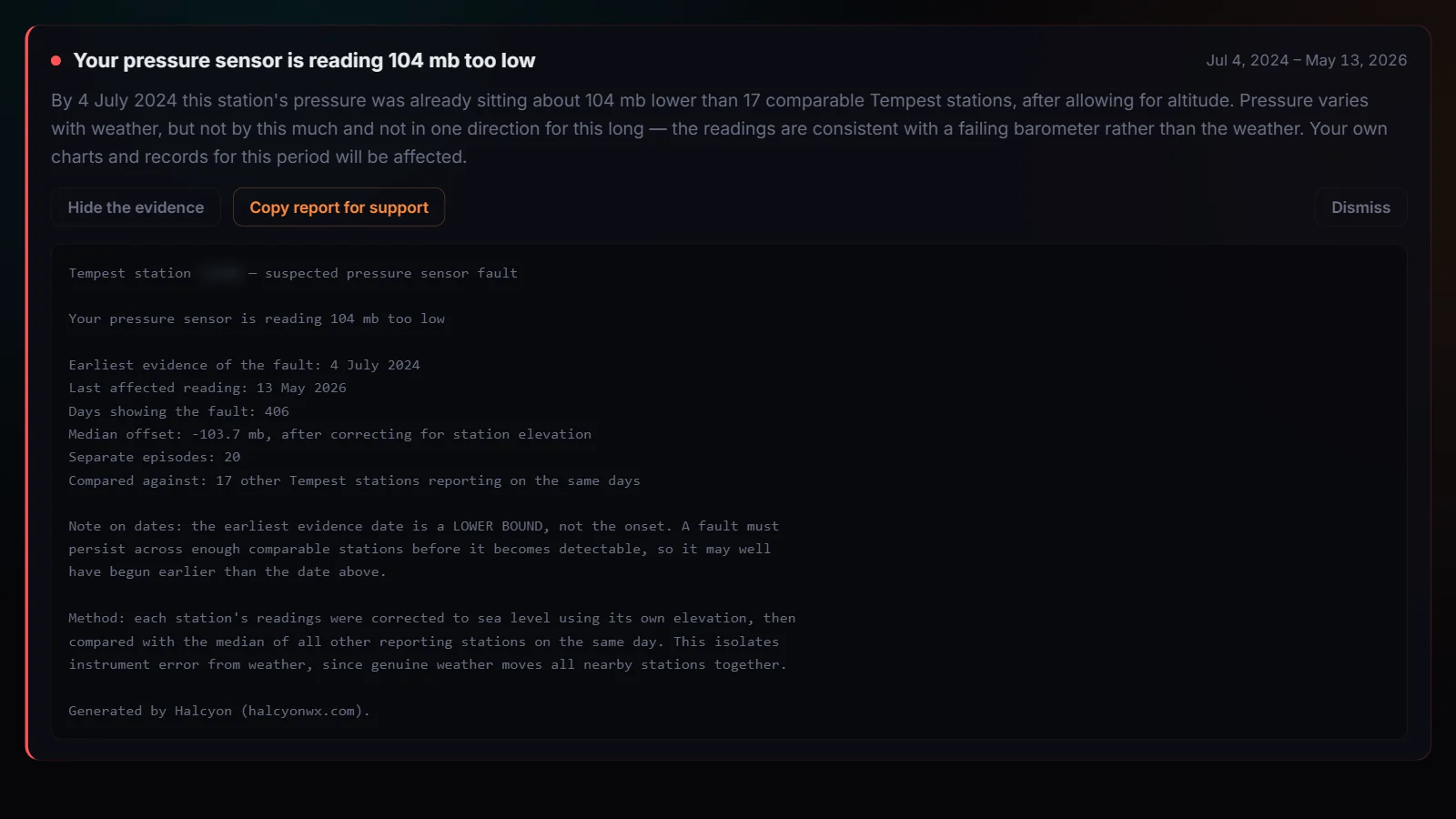
A wind rose that shows where your wind really comes from. A rainfall calendar that maps every wet day of the year. Climate clouds that plot two metrics against each other across thousands of hours. Pin annotations to your timeline — sensor swaps, storms, moves — and they follow your data everywhere. When you want the raw numbers, export any range to CSV.

Halcyon wind rose chart showing a year of wind direction and speed distribution
Halcyon live precipitation radar

Live precipitation radar

Interactive radar map centered on your station. Animated precipitation overlay shows what's coming your way — no app switching required.

Weather alerts, front and centre

Real-time active alerts from the US National Weather Service and Environment Canada, filtered to your station's location. A bell icon in the bottom bar shows the live count. The dashboard's border pulses in tier colours so you notice from across the room, and critical red-tier alerts trigger a full-screen takeover with an attention tone. Four severity tiers match ECCC conventions — red, orange, yellow, grey — each toggleable in Settings so the noisier advisories don't drown out the real warnings.

Halcyon weather alerts from NWS and Environment Canada showing bell badge, dashboard border, and alert list

How Halcyon compares

Feature comparison between Halcyon and other Tempest dashboard options
FeatureStock Tempest AppPiConsoleGrafana StackHalcyon BasicHalcyon Plus
Animated panels
Live precipitation radar
Air Quality (PurpleAir)
Zero setup
Cloud-synced config
No hardware required
Weather alertsUSUS / CAUS / CA
Manual or timer panel rotationManualManual + timerManual + timer
Charts, heatmaps & historyDIY
CostFreeFree + Pi (~$85)Free + server (~$5–15/mo)$14.99/yr$39.99/yr

Simple, transparent pricing

Choose the plan that fits your station. Both include a 7-day free trial.

Basic

$14.99 /year

About $1.25/month

  • 7-day free trial
  • All 11 live panels
  • Real-time WebSocket data
  • Animated visualizations
  • Weather alerts (NWS + Environment Canada)
  • PurpleAir air quality integration
  • Multi-station support
  • Cloud-synced settings
Start 7-day free trial Already have a license key?
Most popular

Plus

$39.99 /year

Includes full charts suite

  • Everything in Basic
  • Full charts & history section
  • Advanced heatmaps
  • Historical records dashboard
  • Data import & CSV export
  • Annotations
  • 7-day free trial
Start 7-day free trial Already have a license key?

No charge for 7 days. Cancel anytime. Your Tempest token stays in your browser — we never touch your weather data.

Halcyon is a product of DAB Worx Inc.

What owners are saying

5.0 / 5 · 8 reviews
★★★★★
“The more I use it, the more I like it.”
— Duvalljm
★★★★★
“Very impressed with Halcyon - I use it for both my properties with Tempest and Purple Air sensors. I use it primarily on a control tablet, but do have it installed on my PC and iPhone. Really like the configurable modules, and the UI. But most of all the developer has been incredibly diligent and responsive, and has added features and resolved issues non-stop. Huge recommendation for the app as well as the developer.”
— Stephen M Bennett
★★★★★
“Nice color graphs. Can watch this all day long. Now I know the weather data! Thank you!”
— Jim Henshaw0
★★★★★
“This feels like the kind of app Tempest should have made! I really appreciate seeing the times of day for the highs and lows. Plus, there’s so much more info, and the layout is fantastic!”
— Keenan
★★★★★
“Great weather information display for my Tempest weather station. Quite responsive and all the features I need.”
— Ddugery
★★★★★
“Best web-based app, best developers! The app delivers WAY beyond what the original product/app could ever hope to do! Halcyon (DAB Worx) crew listens to its users, and they continually deliver beyond expectations every time! They’re second to none.”
— chadyrob
★★★★★
“What a great product and the dev is very responsive. If you have a Tempest, you need this.”
— Db

Frequently asked questions

What do I need to use Halcyon?
A WeatherFlow Tempest weather station and a personal API token (free from tempestwx.com). That's it.
Is my data private?
Yes. Your Tempest API token stays in your browser. Halcyon connects directly to WeatherFlow's servers from your device — we never proxy, store, or see your weather data.
What devices does it work on?
Any device with a modern web browser. It's designed for always-on displays (Raspberry Pi + screen, a wall-mounted tablet, a spare monitor) but works great on desktops, laptops, and even a 65-inch living room TV via Chromecast or AirPlay.
Can I use it on multiple devices?
Yes. Your settings sync to the cloud. Enter your license key on any device and your full configuration loads automatically.
What if WeatherFlow changes their API?
We monitor for API changes and push updates immediately. You don't have to do anything — Halcyon updates automatically.
Can I cancel?
Yes, anytime. Your subscription runs through the end of the paid period.
Can I install it as a desktop app?
Yes! Chrome: three-dot menu → Save and Share → Install page as app. Edge: three-dot menu → Apps → Install this site as an app. Safari (Mac): File → Add to Dock. Safari (iOS): Share → Add to Home Screen. Firefox doesn't support app install, but you can use F11 for full-screen mode. All options give you a clean, dedicated weather display.
What happens when my free trial ends?
Your 7-day free trial includes the full charts experience. After 7 days, your subscription continues on the plan you chose — Basic ($14.99/yr) or Plus ($39.99/yr). Cancel anytime during the trial and you won't be charged.
What's included in the Plus charts suite?
Everything your station has ever recorded, made explorable. Import your complete Tempest history (years of data), then dig in with interactive charts for temperature, humidity, pressure, wind, rain, and lightning: hourly heatmaps that reveal seasonal patterns, a wind rose, a rainfall calendar, climate clouds that plot two metrics against each other, and side-by-side comparisons. A records dashboard tracks your hottest day, biggest gust, wettest hour, and dozens more — each with its exact date and time, across week, month, year, and all-time views — and automatically surfaces your station's patterns in plain language. You can also pin annotations to your timeline and export any range to CSV.
What data does the dashboard show?
Everything your Tempest reports: temperature (current, min/max, feels-like, 24hr trend), wind (speed, gust, direction with animated compass), barometric pressure (gauge with trend), rainfall (rate and accumulation with animated gauge), lightning (distance and strike counts), a 3-day forecast, a radar panel, aviation conditions (METAR from your nearest airport), and astronomy (sun/moon position, UV index, solar radiation). Live weather alerts from NWS (US) and Environment Canada are also surfaced as a bell icon with count, a pulsing dashboard border, and a full-screen takeover for critical warnings. All updated in real time via WebSocket.
Is Halcyon the same as PiConsole?
No. PiConsole is a free, self-hosted Python app that runs on a Raspberry Pi. Halcyon is a hosted web dashboard — no Pi, no Docker, no server. Just open a URL. It's built from the ground up with modern web tech, animated panels, and cloud-synced settings.
Can I use Halcyon with multiple Tempest stations?
Yes. If your WeatherFlow account has multiple stations, Halcyon detects all of them automatically. Switch between stations instantly by tapping the station name in the bottom bar. The clock, forecast, and all panel data update to match whichever station you select.
Does Halcyon work with WeatherFlow Tempest?
Yes — Halcyon is built exclusively for the WeatherFlow Tempest weather station. It connects directly to WeatherFlow's API using your personal access token for real-time data.
Why isn't Halcyon free like other Tempest apps?
Most Tempest community projects are hobby tools built by one person in their spare time. Halcyon is actively developed and maintained as a product — hosted infrastructure, automatic updates, cloud-synced settings, and ongoing development all cost money to run. We've kept it affordable — a Basic plan is about a dollar a month — while making sure it can be sustained long-term.

About Halcyon

Halcyon owes a debt to WeatherFlow PiConsole by Peter Davis — it set the bar for what a Tempest dashboard should look like, and many of the fields we surface follow its lead. We ran it for years on a Raspberry Pi and loved it. What we wanted was the same experience without the hardware to maintain, so we built a hosted web version: open a URL, it works, no Pi, no SD card, no updates.

The goal was simple: a beautiful, always-on Tempest dashboard that works on any screen, updates itself, and doesn't require babysitting a Pi. Real-time WebSocket data with smooth animations, not a static grid of numbers. Something you'd actually want mounted on your wall.

Halcyon is built with modern web technology — Svelte 5, Tailwind CSS, and secure global hosting. Live weather data streams from WeatherFlow directly to your browser — we never proxy it. Your settings, token, and (optionally) historical observations are stored encrypted with your account so the dashboard follows you across devices.

It's made by DAB Worx Inc., a small shop that builds tools we want to use ourselves. If you have a WeatherFlow Tempest station and you've been looking for a better way to display your data, Halcyon was built for you.